Write real code
Use a browser IDE with backend Python intelligence, files, programs and contextual completion.
 AIOTOR AILABS
Connecting to the executable learning backend…
AIOTOR AILABSEXECUTABLE INTELLIGENCE STUDIO
AIOTOR AILABS
Connecting to the executable learning backend…
AIOTOR AILABSEXECUTABLE INTELLIGENCE STUDIO
AIOTOR AILABS transforms difficult programming, machine-learning and robotics concepts into executable lessons. Learners change real code, inspect exact numerical state, watch scientifically labelled transitions and understand why the result changed.
Every lesson connects scientific foundations, editable source code, real output, runtime evidence and practical engineering use.
Use a browser IDE with backend Python intelligence, files, programs and contextual completion.
Rust orchestrates the learner workspace, validation, isolated execution and ownership.
Variables, tensors, model metrics, coordinates, stdout and errors are recorded from the run.
Frames, plots, spatial scenes, terminal output and narration stay synchronized in the browser.
AILABS never treats an attractive animation as scientific evidence. Every frame is classified and carries provenance, so learners know exactly what is computed, interpolated or conceptual.
{
  "state_type": "exact",
  "source": "python_execution",
  "algorithm_step": "update_centroids",
  "iteration": 4,
  "validated": true,
  "interpolated": false
}
Begin with Python, progress through object-oriented engineering and machine learning, then understand deep-learning systems through code and state.
01 from model import NeuralNetwork
02
03 network = NeuralNetwork([4, 8, 3])
04 history = network.fit(data, epochs=18)
05 network.predict(sample)
06 print(history.loss[-1])$ python train.py [epoch 01] loss 0.842 [epoch 06] loss 0.318 [epoch 12] loss 0.126 [epoch 18] loss 0.084 ✓ tests passed: 4 process exited successfully
Pricing and GST are authoritative in the Rust backend. Package access activates only after verified payment confirmation.
No demonstration accounts or preset login credentials are included in this release.
AIOTOR AILABS combines real computation with carefully labelled visual explanation.
Executed lessons derive visuals from the same numerical state used by the code. Interpolated transitions and conceptual illustrations are labelled separately.
Yes. Terminal output, variables, SVG or PNG plots, Plotly figures, Bokeh figures, typed 2D scenes and completed spatial frames are delivered to authenticated browser panels.
Yes. Validated controls update the program parameters, trigger backend execution and regenerate the state sequence and explanation.
Courses and lessons use validated content plug-ins. Administrators can create, edit, validate, reload and publish content without changing the learner frontend when an existing runtime family is used.
No. This release does not create demonstration users or ship preset passwords. Registration remains available, and a bootstrap administrator is created only when a secure password is explicitly configured.
Create a learner account and begin with the free preview lesson in each pathway.
AIOTOR AILABS
AIOTOR AILABSEXECUTABLE VISUAL LEARNINGOne verified, one-time purchase unlocks Python Essentials, Advanced Python and OOP, Machine Learning Essentials, Deep Learning, IDE intelligence, practical labs and the learner workspace.
Payment confirmation is verified by the AIOTOR backend before course access is enabled.Complete the focused Python and machine-learning pathway, then apply both to robotics.
EXECUTEEXACT STATEVISUALIZEReview completed visual frames, explanations, pseudocode and output rather than relying on a final answer alone.
Finish with executable robot trajectories, coordinate transforms and learned risk planning.
Build Python foundations, master object-oriented engineering, then progress through machine learning and deep learning.
Select a lesson. A backend preview will appear here, then Run creates the complete exact-state sequence.
Select a lesson to inspect its execution state.
Runtime ready.
Every control is validated by the backend and applied to the matching Python assignment before execution.
The complete explanation will appear here in a wide, readable learning area.
1
$ AIOTOR LAB ready
Use Run to execute the active Python file in your private workspace.
Create folders, Python programs, tests, datasets, Markdown notes and Word-like learning documents. Everything is owned by your account.
My Workspace
Create a document or select an existing one from your workspace.
Saved lesson variants remain private to your account.
Keep observations connected to the exact lesson where they were made.
Search by course, lesson, topic, concept, reference title or application area.
Completion is based on executable lessons, not passive watch time.
Review the verified purchase and entitlement currently granting course access.
Create courses, publish executable lessons and revise existing material without editing frontend code. Administrator and AIOTOR-role accounts have the same content-management authority.
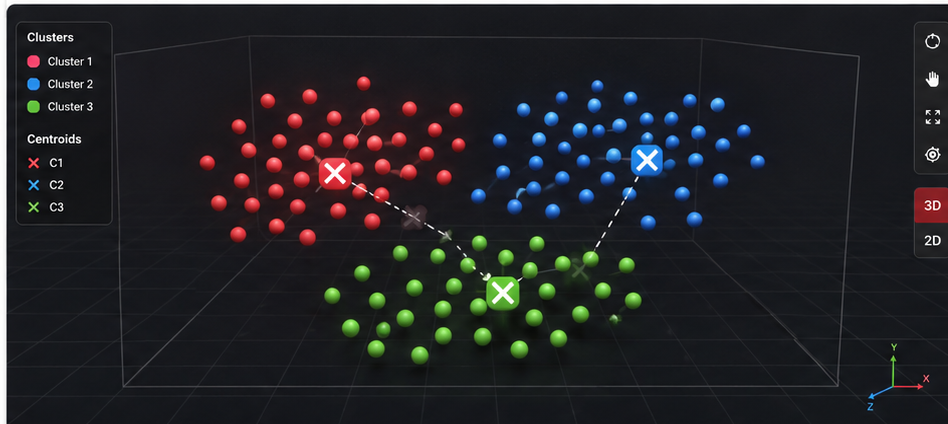 Protected backend spatial frame preview
Loading users…
Use stable lesson IDs so learner progress, notes and programs remain connected when content is revised.
python3 scripts/create-course.py --id applied-robotics --title "Applied Robotics"python3 scripts/create-lesson.py --course applied-robotics --title "Coordinate Frames" --runtime transform3dUse an existing runtime family for immediate narrated animation. Add a new backend runtime family only when the concept needs a new state model.